






Quick, easy and flexible Graphical planning webpart for SharePoint . . .
Pentalogic SharePoint Planner web part is for all those times when you need to plan quickly and effectively - without the complexity of a "Project Management" suite.
Quick and easy to set up and use Planner web part offers you attractive and flexible graphical dashboard displays, ideal for all your daily task, resource and simple project planning needs.
Planner provides wall chart or Gantt chart views of your SharePoint Task and Event list data, which are far more flexible and customizable than SharePoints built in calendar, whilst still being very easy to set up and manage.
Example Uses
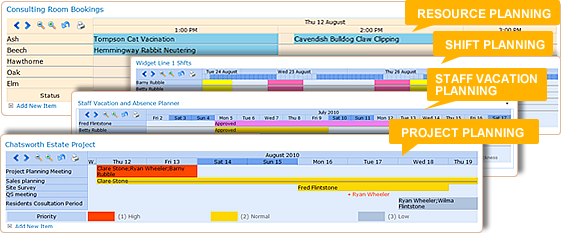
Resource PlanningUse Planner to view bookings for rooms or equipment - and easily spot double bookings or under used resources. |
 |
Shift PlanningUse a category chart to organize and monitor your shift patterns - easily spotting when a shift is not adequately covered. |
 |
Staff Vacation PlanningDisplay a category or classic wall-chart style planner view on your teams site to allow staff and managers to see at a glance when vacation can be booked, and when the department is understaffed. Staff can add their own vacation requests from within the web part view. |
 |
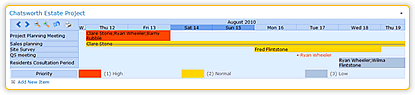
Simple Project PlanningOrganize your projects with Gantt Charts. See Graphically how tasks are organised with Timelines and Milestones. Track progress and see how delays with tasks on the Critical Path could affect delivery. Let team members update their own tasks straight from the web part view. |
 |
Key Features
- Gantt Chart, Category Chart, and Classic Wall Planner styles
- Printable Charts
- Take information from Event or Task Lists – even customized ones
- Color coding to let you easily identify different items
- Progress bars - to check your project is still on track.
- Milestones - to identify critical path events.
- Scale your view to suit your data from hours to years - or let Planner pick the most appropriate scale automatically
- Zoom in and out to see more or less detail
- Scroll backwards and forwards in time through your data.
- Choose which columns to use for labels
- Add, delete or edit items from within the chart view.
- Connect other web parts to provide dynamic filtering - allowing you to focus on specific parts of your data
- Modify the appearance, styles and colors used
FAQ
Which versions of SharePoint does Planner support?
SharePoint Server Subscription Edition
SharePoint 2019 - All editions
SharePoint 2016 - All editions
SharePoint 2013 - Both Foundation and Server
SharePoint 2010 - Both Foundation and Server
How do I use Pentalogic Planner?
Pentalogic Planner is delivered as a SharePoint web part. Once installed on a SharePoint server you add it to a web part page and then configure it to point to an Event or Task List.
Does Pentalogic Planner have advanced project management features?
No - Pentalogic Planner is not intended to replace project management software for complex projects. It allows you to take existing data that you store in your SharePoint site and display it in several useful ways
Does Pentalogic Planner need any client software of ActiveX/JavaApplets installed?
No - it works using standard HTML only, no client software is required.

